logのcsv出力クラス ちからずく自作(探せば有りそうだが・・)
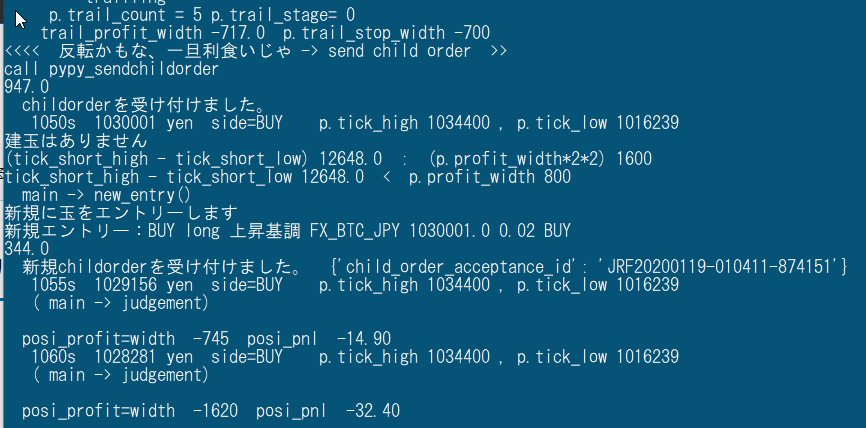
テキストラインのLOGは超速で流れていくので読み取れない
テキストでLOGファイルに出力しても、同じ係数を追うのが大変である。
そこで、csvファイルに出力すればエクセルでパッと開いて縦列を目で追うだけで比較がしやすい。
ロジックはこうだ
logから、日時や補足情報を取り外し、裸のデータ1件を出力(list[].append())。
これをカラム分だけ繰り返して一行分のデータになっったところでcsvに1行書き込む。
こんな感じである↓
だ,だ,だ,だ,だ,だ,だ,だ
だ,だ,だ,だ,だ,だ,だ,だ
なんとも泥臭いが、今の俺のレベルでは実現できれば何でも良い。
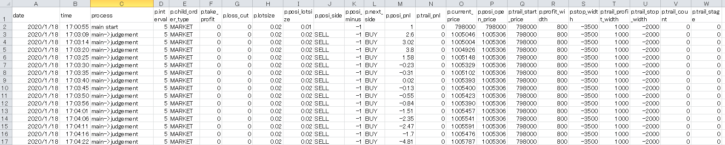
できてる(≧∇≦)b
使い慣れてるエクセルは、扱いやすく、分析も捗る。
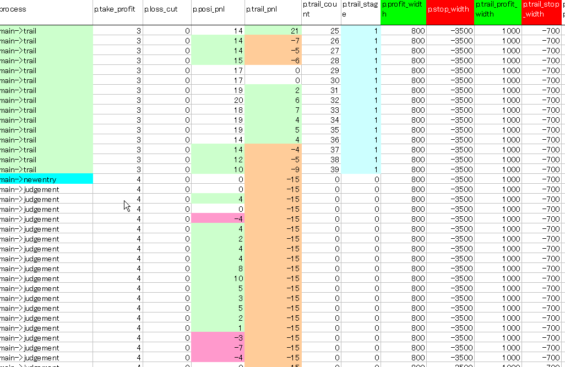
ソース置き場 クラス化したので他でも使えるが要整理
データ受け渡し失敗に付き修正中
import csv
# coding: utf-8
import csv
from pprint import pprint
import time, datetime
from parameter import Parameter
p=Parameter()#パラメーターの読み込み、同上
con_row=0
loglist1=['日','時','status','勝','負','計','Ppnl','Tpnl','Tcount','Tstage',
        'Pside','price','Popen_p','Tstart_p','Plot','Pminus','Thigh','Tlow','next_side',
        'profit_w','stop_w','Tprofit_w','Tstop_w',
        'interval','size','Corder_type']


class Log2csv():


    def __init__(self):
        #self.status=status
        today = datetime.datetime.fromtimestamp(time.time())
        today.strftime('%Y/%m/%d,%H:%M:%S')
        self.log_file='log\LOG' + today.strftime('%Y-%m-%d-%Hh%Mm')+'.csv'

    def status_first_print(self):
         with open(self.log_file,'a',newline='')as f:
            writer=csv.writer(f)
            writer.writerow(loglist1)

    def status_get(self,status,p):
        self.status=status
        self.p=p
        today = datetime.datetime.fromtimestamp(time.time())
        today.strftime('%Y/%m/%d,%H:%M:%S')
        loglist=[]
        loglist.append(today.strftime('%Y/%m/%d'))
        loglist.append(today.strftime('%H:%M:%S'))
        loglist.append(self.status)
        loglist.append(self.p.take_profit)
        loglist.append(self.p.loss_cut)
        loglist.append(int(self.p.total))

        loglist.append(int(self.p.posi_pnl))
        loglist.append(int(self.p.trail_pnl))
        loglist.append(self.p.trail_count)
        loglist.append(self.p.trail_stage)
        loglist.append(self.p.posi_side )

        loglist.append(int(self.p.current_price ))
        loglist.append(int(self.p.posi_open_price ))
        loglist.append(int(self.p.trail_start_price))
        loglist.append(self.p.posi_lotsize)
        loglist.append(self.p.posi_minus)
        loglist.append(int(self.p.tick_high))
        loglist.append(int(self.p.tick_low))

        loglist.append(self.p.next_side)
        loglist.append(self.p.profit_width )
        loglist.append(self.p.stop_width )
        loglist.append(self.p.trail_profit_width)
        loglist.append(self.p.trail_stop_width)
        loglist.append(self.p.interval)
        loglist.append(self.p.lotsize)
        loglist.append(self.p.child_order_type)

        return loglist


    def log2csv(self,status,data):#csvファイルに出力しエクセルで見る
        self.status=status
        self.data=data
        with open(self.log_file,'a',newline='')as f:
            writer=csv.writer(f)
            writer.writerow(self.status_get(self.status,self.data))

    def log2con(self,status,data):#モニターで見る
        global con_row
        self.status=status
        self.data=data
        if con_row==0:
            for i in loglist1:
               print (i,end=' ')
            print('')#改行
            con_row=1
        else :
            for i in self.status_get(self.status,self.data):
                print(i,end=' ')
            print('')
            con_row+=1
            if con_row>10:
               con_row=0
'''
使い方(main側)
#インスタンス化
p=Palameter()

l2c=Log2csv()
l2c.status_first_print()#タイトル行は別に指定
l2c.log2csv('start',p)
l2c.log2con('start',p)

'''
logの設定ファイルmanekineko.conf
(はじめは必要だった、今も必要なのかどうか覚えていない)
[loggers]
keys=root, logExample

[handlers]
keys=consoleHandler, fileHandler

[formatters]
keys=logFormatter

[logger_root]
level=DEBUG
handlers=consoleHandler

[logger_logExample]
level=DEBUG
handlers=consoleHandler, fileHandler
qualname=logExample
propagate=0

[handler_consoleHandler]
class=StreamHandler
level=DEBUG
formatter=logFormatter
args=(sys.stdout,)

[handler_fileHandler]
class=handlers.RotatingFileHandler
level=INFO
formatter=logFormatter
args=('neko.log',)

[formatter_logFormatter]
format=%(message)s #メッセージしか設定してない
datefmt=
マメに改良を加えている。
画面表示もこれを使うようにした。ただ、エクセルのようにタイトル行の固定機能はないので、数行に一回タイトルを出力するようにした。
いいかんじだー。